How to Use Rejection

One of the more exciting things in life is to be accepted to do something that was competitive, and where you stood a good chance of rejection. That could be our stretch choice college that seemed out of our reach. Or that new job or promotion that we technically don’t qualify for. Or as simple as getting a date with someone out of our league.

It’s exciting to punch above your weight.

But, the chance of rejection can sometimes make us not try. We say that we’re not ready. That is probably true. In fact, the more chances you take, the more likely it is to be true.

But, rejection is a great way to find out how to get ready. It’s not something to be avoided. It’s a tool we can learn to use.

Here are ways we can use the possibility of rejection

  1. To motivate us to practice and prepare
  2. To focus our requests for help

Here are ways we can use actual rejection

  1. To ask for specific feedback
  2. To drive a post-mortem
  3. To improve our approach for next time
  4. To help others in our position

Soundtracks for Books

When you read, your visual senses are completely flooded. You should also be engaging in Slow Thinking (System II type thinking) as described in Thinking, Fast and Slow. This is self-aware, effortful thinking.

You are generally not capable of directing slow thinking at two tasks, which is why you shouldn’t text and drive. And it’s why you can’t read and listen to a podcast.

But what if you could listen to something? What ever the book is for, could your audio senses augment what you are reading?

I am not just talking about an embedded audio clip. To listen to that, you’d stop reading. I am talking about a book’s soundtrack.

In a movie, the soundtrack is integrated to provide a deeper experience. Sometimes it’s meant to be as prominent as the foreground, and other times, it might not be consciously noticed.

Movie visuals and audio are synchronized. So, to do this, the reading device would need to know exactly what you were reading at any point. In this sense, it’s more like a video game soundtrack, which is also synchronized, but has to follow the player’s actions.

Let’s assume that’s possible. Given a book device that knows exactly what you are reading at any point and can produce sound, here are things it could do:

  1. If you stop and stare at a word or phrase that is jargon the book defined, it quickly reminds you of the definition.
  2. Like Peter and the Wolf, we could assign small musical themes to the major ideas of the book. When you are reading something that is related to one of those ideas, the theme would play.
  3. It could use generated sound or music that goes from calm to more of crescendo as you progress through a chapter, giving you a sense of how close you are to the next break. For example, rainfall that becomes more of a storm—an audio progress bar.
  4. I think fiction would use this more for entertainment/art, but one exception is trying to read Shakespeare. I remember the left-hand side page having contextual information for the script on the right-hand side—maybe the context could be delivered aurally while you read.

If we could do this, it would drive book design to take sound into account (rather than it just be guessed at by a device) and eventually evolve the medium further away from text-only books.

Programming With the Joy of a Thirteen Year-Old

One of the exercises in How to Make Feeling Good a Priority by (my running coach) Holly Johnson is to list out the things that gave you the most joy at different stages of your life. For my teen years, I listed programming. I also listed it for later stages, but thinking about it, it was a different activity.

Programming as a teenager had no real point except to do it. At fifty, I still program nearly every day, but mostly as a job. I love it, but it’s different.

Most of my teen programs were unfinished—many times I just wanted to accomplish one effect and then moved on. Many of them were assignments in programming classes, but outside of that, they were unshipped.

I ship way more of my work now, but I wonder what I would make if I had no intention to ship.

Use Deprivation to Make Space

The Artist’s Way Week 4 asks you to engage in “reading deprivation”. For a week, you refrain from consumption (reading, TV, movies, and of course social media), but not music. It’s meant to open space for you to do your own work.

I wrote about my writing during reading process, which means I need to read a lot to drive my writing. So, this task was hard to accept as useful.

But, it did have its intended affect. With nothing to distract myself with, I wrote a lot more than usual in this blog and in my personal notes.

Indefinite reading deprivation would eventually exhaust my reserves, but this was an exercise worth repeating.

Combining Identities

I have been programming since I was 13. I am a programmer in a very deep way. I do it nearly every day, and it brings me joy.

I have tried to be a runner for the past 15 years and had some success, but never was able to make it a permanent part of my life—I was not really a runner.

Two years ago, I did a few things to take up the practice of running more seriously. One of my tactics was to combine my programming identity with a nascent running identity.

My coach, Holly, assigns me several programmed runs every week. They are of the form: Warmup for 15 minutes, then do 6×3:00 at 5k pace, with a rest interval of 2:00, and then do a 10 minute cooldown. There are a few different patterns.

I made Sprint-o-Mat, an Apple Watch app to guide me during these runs. It has template patterns that you can customize and then buzzes/dings my wrist to let me know to start a sprint, a rest, or whatever is next.

I want to run to play with my app. I want to program to help my runs. In 2020, I ran two marathons, so I do really see myself as a runner now.

The next thing I am tackling is how to tie a writing identity to programming as well. Unlike running, I don’t think I want to work on a writing app. But to combine programming and writing, I do need some kind of project that uses both.

Note: I released a major update to Sprint-o-Mat. See a post about its new interface and how that influenced its icon design.

January 2021 Blog Review

Last month, I wrote mostly about how we can apply game design to books and apps. By this, I mean making the book or app literally a game (like Pokémon Go), not slapping on badges to gamify an app. Speaking of Pokémon Go, I have ideas for how AR will turn mundane apps into games.

I also covered parts of my daily and weekly routine, and how I use habit totems to keep myself on track.

I wrote a little about programming. I think tutorials should be vaguer because they would force learners to write programs, not read them. If they were, they would be better preparation for coding interviews. I updated my 2011 advice on GitHub profiles. I covered two approaches to app icon design, icon-first and icon-last.

In February, I plan to talk more about my practice of daily coding, writing, and sketching.

Make a Game out of an App

I’ve been exploring the intersection of games and things that aren’t really games, and using playability to make books and apps better. In past articles, I’ve talked about how this is not gamification, which I view as a tacked-on layer. I gave the example of Pokémon Go vs. Apple Workouts to illustrate the difference.

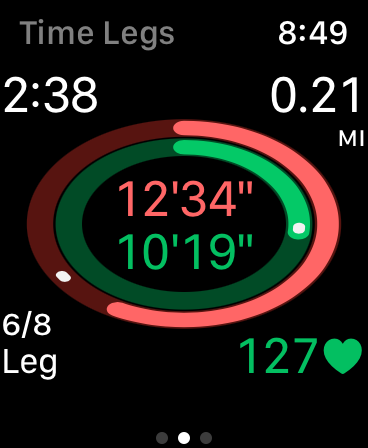
I recently made a major update to Sprint-o-Mat that made the UI more of a visualization. My goal was to make it easier to get the most important information at a glance.

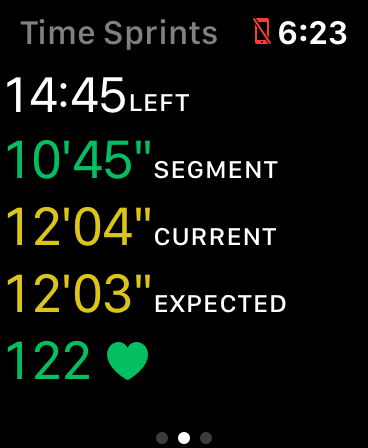
But, running with it today, I realized that it’s also now a game. Instead of showing this:

I show this:

The white dots are pace-setters, and so now it’s a game—a race. It’s a rudimentary one, but racing is fun, and I think this now is a fruitful direction for making it more and more like a race.

In a real race, one of the most fun parts (to me) is when you are close to another runner and have to compete. This is where I think I can add some functionality in the next version.

I could do even better if Apple Glasses are real.

Lowering the Bar to Practice

There are three things that I try to do nearly every day: code, write, and sketch. Of the three, I struggle most with sketching.

It’s also the case that of the three, my sketching is the least developed. I am a professional programmer, and I have had some success writing professionally, but my sketching is (to be the most charitable) “advanced beginner”.

It’s also the case that I have spent orders of magnitude more time coding and writing than sketching.

This year, with my theme to Hone, I am committed to just making as many bad sketches as I can. Honing is sharpening by repetition.

So, I remembered a lesson from a sketching class I took a few years ago—warming up with blind sketches.

In a blind sketch, you look only at the subject and not at the paper at all. You may even decide not to lift the pen. You try to get a sense of the canvas with just your hand. Part of what you are developing is the skill of drawing what you see (the shapes and values in the space), and not symbols of what you see.

I use a big pen (1.0 mm) to make sure that ink makes it on the paper (since I am not looking, sometimes my thinner pens don’t always make marks) and to further lower the bar on the expected outcome.

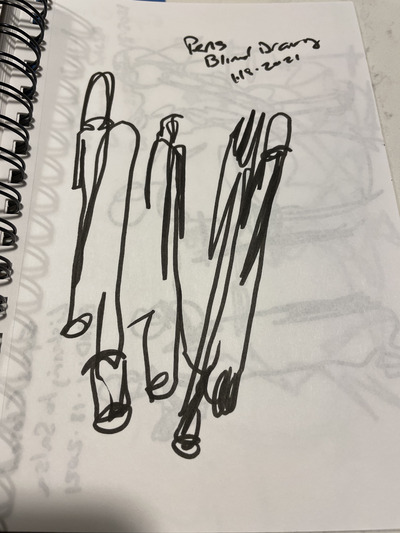
These sketches are “easy to do” in the sense that I can do them at any time. I just draw what’s in front of me. Here are some pens:

I do a few of these and then I might move onto a longer sketch. But, even if all I do is some blind sketches, I’m ok with that.

My Habit Totem for Daily Routines

In Environment Hacking, I wrote:

In [the Fogg Behavior Model], we add prompts to our environment for things we want to do more […] changing our environment to influence our own behavior. I have been thinking of “habit totems” I can put into the environment to prompt me.

So, in the past, when I’ve tried to institute daily startup and shutdown routines, it would fall apart eventually because I didn’t remember to do it. It was a partial habit at best.

So, this time, I designed a custom bookmark. I use them in my journal, my sketchbook, and any book I’m reading. Here it is (I got them made on VistaPrint):

The words under each routine are a short-hand. “Breathe” means meditate, which could be with the Breathe app on my watch, or any other way. “Practice” means to do my daily practice of coding, writing, and sketching. Hone is my yearly theme.

In practice, the biggest help is to remember to plan the next day. It only takes a few minutes, but makes all the difference.

I tried to think of something clever to put on the back of the bookmark, but I was so indecisive about it that I finally just stuck a photo I took of a Florida beach sunset and called it a day.

End Your Week with a Plan for Next Week

This is a follow up to my end-of-day tomorrow planning.

I run my weekly plan Monday-Sunday, so sometime on Sunday I’ll start to make my plan for the upcoming week.

The first thing I do is collect my WINS from my daily plans. At the end of each day, I tried to pick out something from the day that would bring me joy to reflect on later. Now (at the end of the week) is later.

Under that I put a BIG 3 checklist for the week. These are tasks I commit to do the following week. Each might take several days, so I need to break them down.

So, under that, I write the date of the next seven days on separate lines. I try to break down my Big 3 into tasks that need to be done each day that will eventually accomplish them. These will feed into my daily plans that week.

I’m not going to write a separate post for it, but I also have a monthly plan with a monthly Big 3 and biggest WINS. The entire thing rolls up to my yearly plan, which is a one-word theme and some high-level ideas of the kind of things I want to do that year. Months and years are not planned out as thoroughly as weeks and days—they are mostly a guideline to provide some direction.