Category Archives: Software Development

Learn Programming by Writing Programs

Most programming books and tutorials show you code and explain it. What they should be doing is describing code they want you to write.

Here are some examples:

  • Project Euler presents one numerical programming problem at a time. You must provide the correct answer (a number) before you can see the next one.
  • Apple’s Swift playground books on iPad also make you write code. Your programs move a robot around a board, and it knows if you achieved the goal they specified.
  • The Unwrap app by Paul Hudson. It combines video and written lessons with challenges of various types including writing Swift code. Each lesson is very small.
  • freeCodeCamp breaks down learning web development into tiny coding challenges that are auto-checked by the site.
  • Cryptopals teaches you how to write cryptography and code that attacks it with lessons you check against the expected output.

The big advantage of this style is each level can be very focussed on using just one new skill. In this talk by Kathy Sierra (and in her book Badass) she covers the research behind skill acquisition. One big idea is that you need to break skills down into tiny sub-skills. The reason is so you can master part of a skill, rather than half-master a full skill, which is hard to improve later.

She also says that learners need feedback, which these systems do by verifying your work automatically (or by having an expected output you can check).

In contrast, most programming tutorials are quite long and don’t make you create your own programs (so can’t really provide feedback).

If all you do is read or type in the code in the tutorial, you aren’t practicing a core skill of programming, which is to write code on your own to match a specification.
App-o-Mat updates

I started App-o-Mat as an iOS tutorial site back when I was consulting. It mostly had cordova screencasts.  I’m going to be doing more writing about iOS there (native and possibly cordova-based).

You can subscribe to the mailing list there if you want to get updates. If you have requests for topics to write about, let me know.

Here are the latest posts:

How do I pass values from a VC back to the VC that presented it?

Ok, so you have a view controller that brings up another view controller. Let’s call the first one FirstVC and the second one SecondVC. FirstVC either presents SecondVC or there is some segue that it uses to bring it up.

How do you keep Storyboards from causing merge problems later?

There’s this myth in the iOS community that “professional” iOS developers never use Interface Builder. It’s meant to imply that coding your interfaces is always better, and if you don’t do it, you are somehow less of a programmer. The myth perpetuates the idea that IB is a crutch, a toy, something that only newbies use.

I call BS.

How do you pass values to a VC in a segue?

A theme I see a lot on StackOverflow is a developer makes a View Controller that collects some information from a user and wants to use it on a VC that they bring up in a segue.


GamePlayKit Rule Systems on Smashing

I wrote a 2-part series on GamePlayKit’s Rule Systems framework for Smashing Magazine.

Part 1 is the basic idea and shows how to replace conditional logic that might be strewn around a project into a GamePlayKit rule-system.

In Part 2, I show the support for fuzzy logic rule-systems (logic values ranging from 0.0 to 1.0 instead of strictly true and false). It covers a little more of the features of rule-systems and how to implement NOT, OR, and AND for fuzzy values.

Both articles are supported by Swift Playgrounds in GitHub so that you can play with the concept and try different rules.

Swift Playground Books: 2-Sep-2016

I imagine a lot of the information here is going to go out of date fast, but if you are looking at playground books today, here is where to start.

  1. The WWDC 2016 talk, Introducing Swift Playgrounds, has a lot of technical detail about the .playgroundbook format and how the LiveView proxying works.
  2. The demo for that talk is available on Apple’s dev site, but it’s out of date. I’ve been updating it for each iOS 10 Beta (to track Swift 3). Go to my GitHub to get the fixed Talking to the Live View sample.
  3. The documentation for the .playgroundbook format can be found on the Apple Developer site.
  4. Erica Sadun, who has written the book on Xcode playgrounds did some early investigations of iOS Swift Playgrounds. You might want to read them — here is Part I, Part II, Part III, Part IV,  and Part V.
  5. Ash Furrow made a playground book linter and authoring tool (source). You can use the linter on any .playgroundbook (however you make it), and the authoring tool allows you to specify the parts of the book in a .yaml file, and it puts each piece in the correct file and folder for you in the .playgroundbook package.

Habits 3.0

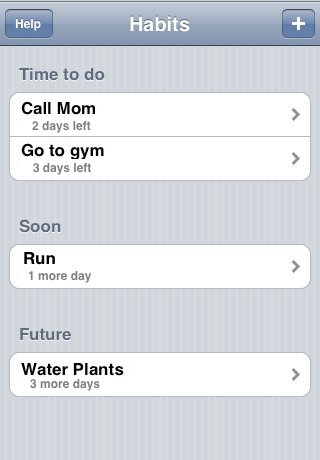
Back in 2008, I learned Objective-C to make my first “iPhone OS” app, Habits. When it was released, Habits looked like this:

habits-screen

This weekend I finally finished v3.0 and made it free.

As this is a developer site, the more interesting thing to note is that Habits was originally made in the first iPhone supporting version of Xcode (with external Interface Builder) and I have been migrating the project file from version to version since then (using 7.3.1 to make the current build).

Some things that were introduced into Habits for this version:

  1. Swift – all new classes were made in Swift and many existing ones were refactored into Swift
  2. Accessibility – Since NSSpain 2015, I’ve been running my iPhone with triple-Home to get into VoiceOver (suggested by Hermes Pique in this talk). Doing that made me realize (1) what it was like to use Habits without looking at it (2) how easy it was to make it work properly.
  3. fastlane – specifically “deliver” to manage the iTunes record and “frameit” for fancy screenshots
  4. Carthage – there had never been 3rd party libraries in Habits, but I decided that one was worth it this time.
  5. TOCropViewController – A simple framework that does one thing very well – provide a View Controller for cropping images. I use this instead of the built-in iOS one because it supports locked aspect-ratios.

Enjoy!

Test First as a Habit

I am not a TDD zealot (or even really a practitioner), but on The App Guy podcast, Paul Kemp asked me if I had any habits to share as an app developer.  I said:

My app developing habit … is get a new passing unit test every day.  […] that new green dot is my indication that I’ve at least added a little bit to the application.

This is a habit I started in earnest when I took B. J. Fogg’s Tiny Habits course. My tiny habit was to just run the simulator, and the best way I found of doing that was to run the tests through it. Then, writing a new test for whatever functionality I was planning next just seemed to be the perfect way to extend it.

Once I write that first test, I don’t TDD the rest of the way, but I’ve found that first test to be a good way to warm up.

Working with both Xcode 5 and Xcode 4.6.x

You can have both versions of Xcode on a machine simultaneously.

Here’s what I did

  1. I installed Xcode5 normally
  2. I downloaded Xcode 4.6.3 from the Apple developer website and copied that into my Applications folder as Xcode_4_6.app
  3. I downloaded the iPhone/iPad iOS 7.0.2 ipsw’s from the developer website and loaded them into the 4.6.3 Organizer (Devices -> Library -> Software Images).
  4. In order to get Xcode 4.6.3 to see an iOS 7 device, you need to start Xcode 5, load a project so that it connects to the phone, and then exit Xcode 5 and start Xcode 4.6.3,  You periodically need to do this again (probably whenever you restart Xcode, but not every time you plug in the phone)

One annoyance is that both versions share Recent Projects and will automatically open projects that are open in the other one.  It’s usually best to only start one if the other is closed or doesn’t have any projects open.

I also read on StackOverflow that you can get Xcode 5 to create iOS6 apps by making a symbolic link from inside the Xcode 4.6.x app bundle to inside the Xcode 5 app bundle.

3 Tips for Making Sure an Ad Hoc iOS Build Will Work

If you build iOS apps and send the IPA to others to install, there are a few simple checks you can do before you send it that will make sure it will work.

  1. Go into your Build Settings and set the “Validate Built Product” to Yes — that way you won’t be able to build if your provisions are wrong. This is the default for new projects in recent versions of Xcode, but check it to make sure.
  2. Open the IPA that was created. It’s a bundle, so copy and rename the extension to .zip. Then look for the mobileprovision XML file.  You should see the device UDID that you intend to send it to.
  3. Always increase the version # of any build that leaves your machine.  If you don’t do this, iPhone Utility or anything else can decide to offer a cached version instead. If you have a good place in your app to show the version, do it.

If #1 above causes you not to be able to build, then use Apple’s Provisioning Troubleshooting guide.

If the device isn’t listed in the mobileprovision file, then make sure it’s added to the provision in developer.apple.com’s certificate area.  Regenerate it and download it once it’s right.

Even if you are using a system like TestFlight, (edit in 2020: TestFlight is part of Apple now, for AdHoc builds, try AppCenter instead) you should follow these tips. TestFlight can’t make an invalid app work, and it can’t fix an IPA that doesn’t have all of the device UDIDs in it.  All it does is automate over-the-air IPA installs (which is great), but it still operates within the confines of the app distribution system.

No Pixel Left Behind

I’ve been running iOS7 for a few weeks now as I refresh the look of my apps.  Habits is kind of getting there, but I’m trying to internalize the design lessons of iOS7.  Basically, my mantra is, “no pixel left behind”, which means

  1. If I can change the color of a pixel with no loss of semantic meaning, make it the background color
  2. If I can add meaning with space and grouping, do it, and remove more pixels
  3. If I can add meaning with color, do it
  4. It’s ok to have “brand” colors, but use them only when you need contrast

Here are some other lessons

  1. Prefer to reveal more UI rather than navigate
  2. Make gestures feel like they are moving a physical object (e.g. use pan instead of swipe)
  3. Prefer fewer words, but use enough to not be distracting

Habits 2.02 should be ready in a week with these lessons applied.