Category Archives: Software Development

The Seed Bank Hackathon Story

I spent last weekend at UMass with over a hundred fellow hackers to work on local challenges as part of the National Day of Civic Hacking. The event (Hack for Western Mass) itself was masterfully run by an amazing group that I hope to work with again.

The team I was on successfully completed our goal to get the Hilltown Seed Saving Network  a webapp to manage their decentralized seed bank.

Here’s what worked for us

We started before the weekend. Using the event’s wiki, Rosemary (a member of the network who knows HTML, but needed help on the back-end), Beryl (a CIT professor at Elms College) and I connected. We had a thorough discussion in the week before the event, and it became clear that Beryl and I could collaborate in python using Django to do this. Beryl knew python and did Django tutorials to prepare, and I have a few small Django backed sites.

We were a small team with complementary skills. At the event, we picked up Sheila, a new team member who set up our Facebook and Twitter pages, as well as training Rosemary on Hootsuite so that should could manage interactions.  During the event, a seed swap was executed using Facebook — talk about a minimum viable product! Beryl and I worked on the site, and Rosemary worked on our HTML template. We were a small, but efficient and effective team.

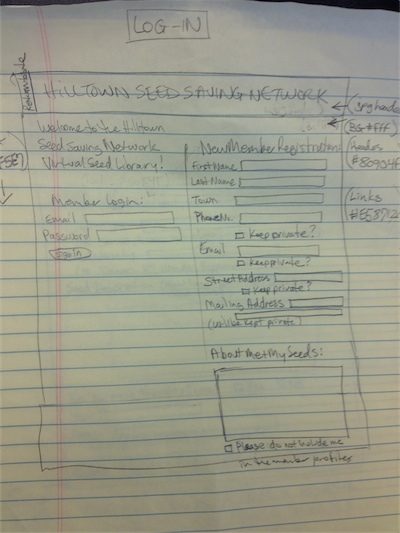
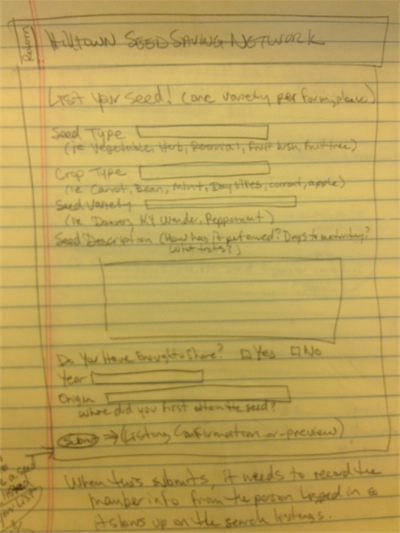
Rosemary came with wireframes. Here are the login and the add seed wireframes. She brought about a half-dozen more. Here’s the production version of login and add seed.

We set up a system to keep going. By Saturday night an 80% functional app was in the hackforwesternmass/seednetwork repo on GitHub. Since the event there have been dozens of small commits. It’s been really fun working with this team, and we have systems set up to work together.

We got to production as fast as we could. One of the organizers, Andrew, gave me a crash course in Heroku, and I had it done Sunday evening (Hilltown Seed Saving Network seed bank production site). Next time, I would do this as soon as we had anything ready to go.

We stayed focused. By Sunday, with only four hours or so before the presentations, there were a lot of possible distractions (incorporate maps? go on community access TV? prepare our presentation!) We tried to keep the end-goal in mind — get the Hilltown Seed Saving Network a functional app. We might revisit some of those ideas later, but having a clear goal made it possible to ignore everything else.


Introducing fishbike: Pure procedural programming

As an aspiring FP connoisseur, I spend my free time thinking about higher order functions, data-ing all the things, and hating on blub. One of my favorite new twitter follows is @jessitron (seriously, just go watch everything you can find, especially Functional Principles for OO Development).

In any case, she recently tweeted:

Which got me thinking — what if the procedure was pure? Then, you could replace it with nothing! Talk about power.

On my way to work today, I banged out a prototype, and so, I proudly introduce fishbike — pure procedural programming. Admittedly, uses are limited.

You can use the fbc command as either an interpreter or compiler, so, first create a text file called primes.fb (you can use touch). This is a fishbike program to find all primes not divisible by themselves. Since this is a procedure, it can’t return anything. So, if it finds any, it will do some side-effect (update your database, tweet the answer, email your mom, etc). Run it with:

fbc primes.fb

Or compile it with

fbc primes.fb > primes
chmod +x primes
./primes

Enjoy!

Oz: Review of wizard projection technology

This is the latest in a series of limited perspective movie reviews. These reviews, inspired by a Letterman bit, look at only one narrow aspect of a movie, related to software engineering or software business.

SPOILER ALERT: These reviews assume you have seen the movie.

Here’s Inception, Twilight: Eclipse, Twilight: Breaking Dawn, Star Trek, and Alien.

Before I wrote this review, I researched the novels of Frank L. Baum, and I was surprised to learn that he came up with the idea of augmented reality in his book, The Master Key. Following that thread, I found another AR reference in his writing—this time in The Wizard of Oz. It turns out that in the book, when Dorothy enters Emerald City, she is given glasses that only make it look like the city is made of emerald. Unfortunately, Oz is a faithful prequel to the movie, not the book, so its Emerald City is actually made of emerald too, which sucks because in my head, I was already photoshopping Google Glasses onto a picture of James Franco.

Instead, I’ll concentrate on the one big use of advanced technology, the wizard’s “ghostly head” effect. If you remember the Wizard of Oz, we first see the wizard as a ghostly head appearing in smoke.

Wizard of Oz

Later, this is revealed to a projection from a complex machine operated by a man behind a curtain.

Wizard revealed

In Oz, we get a little insight into this machine. It’s implied that it was inspired by the Projection Praxinoscope.

Projection Praxinoscope

He combined the idea with Phantasmagoria, which is the projection onto smoke.

The thing is, in both of these technologies, you need to put the image on a transparent slide to shine light through. In the wizard’s case, he was able to project his live head (not a series of still images). I see no reference to this technique anywhere, but it’s a plot point that he’s being helped by The Master Tinkerer (who, in the novels, created the Tin Man), so we can assume that he could invent something.

The only thing I can think of is using a one-way mirror somehow. When I researched that, I found Pepper’s ghost:

Pepper's ghost

In this case, you are looking through a view-port (red rectangle) at an angled one-way mirror (green rectangle). The left area is out of view, and shows up in the mirror when it is lit.  You make the ghost appear and disappear by raising and dimming the light in the off-stage area as compared to the area through the mirror.

So, it’s not a projection, but I could imagine a master tinkerer and Oz (who is himself a master in prestidigitation), could figure out some way to combine these technologies (all available in the late 1800’s) to a new live smoke projection effect.

What I can’t imagine is how the older wizard is able to upgrade this to show the green, bald head instead of his own.

App.net is Bring Your Own Back-end (BYOBE) for mobile apps

When I read this about Climber (a new iPhone app that lets you post short videos to App.net):

Our video pages simply rely on App.net post data to retrieve links to video files contained in personal App.net file storage. If a user chooses to delete their App.net post, or even just delete the video file in their file storage, then it can no longer be viewed on our website.

It struck me that the full cost of the back-end of this app was being paid for by the user. Until this, developers typically paid for a back-end or relied on free services.

When the developer paid, they had to deal with their app having a low, fixed life-time value, but unbounded costs. They either added a premium subscription service (Evernote), in-app currency (mostly games), or ads. Another common solution was to get acquihired before it imploded and have the new owner assume the costs (Instagram) or shut down the app (nearly everything else, but recently, Summly).

If they relied on free services, then they risked the service going away. Mobile RSS readers that treated Google Reader as a sync-service now have to either create their own or see what develops. Twitter client developers got hit with limited user-tokens.

App.net is offering another choice — Bring Your Own Back-end (BYOBE) — where they sell the user on the benefits of a backend and deliver less value to the developer (for a lower cost).

BYOBE isn’t new with App.net. Salesforce users have Apex, where they can find 3rd party apps that run on Salesforce servers. Apex app developers do not have to build out infrastructure for their applications if they can stay within Apex guidelines. In some sense, Evernote premium is also BYOBE for 3rd party applications. In fact, any app developer who solves their business model issue with a subscription service, can also transition to being a BYOBE provider. I’d put Github, Dropbox, and many others into this category.

But, App.net is nearly a pure-play BYOBE and is planning on something more general purpose than what we’ve seen. In the founding documents of App.net, Dalton Caldwell wrote:

As I understand, a hugely divisive internal debate occurred among Twitter employees around this time. One camp wanted to build the entire business around their realtime API. In this scenario, Twitter would have turned into something like a realtime cloud API company. […] I think back and wish the pro-API guys won that internal battle.

The price for developers is a flat $100/year. App.net gets its variable revenue from the app’s users as they must subscribe in order to use any app on top of the infrastructure. It’s tempting to think that they are paying for Alpha (their Twitter clone), but that’s just an app built on the infrastructure — they are paying for API usage, not Alpha.

App.net is not a paid service for mobile application developers — App.net is a paid service for mobile application users. The closest thing I can compare it to is iCloud, where users pay for iTunes Match or more storage, but developers get a syncing API to build on (or will eventually, when it works).

The benefits to users are clear (they are now paying, so they accrue some value)

  • They control their data
  • They aren’t sold to advertisers
  • They can plan on some sort of longevity and consistency

Developers, who now have lower costs, also get less value.

  • They give up control of the user and user data
  • It would probably be harder to independently charge the user another subscription

They do get a service they can count on, but they could have that with Parse, Kinvey, AWS, or any number of paid back-end as a service companies. Most of the developer benefits are over free services, which I don’t think make sense to build on.

I certainly see why I’d want to be an App.net user based on this — but, since I don’t want Alpha (or message feed based services), it will make more sense when the app market is more diverse (not a bunch of Alpha clients).

As a developer, this model appeals to me because I think of this space more like a hobby — I would definitely forgo control to not have to think about or pay for the back-end. It would be even more interesting if App.net had a payments option or revenue share. Rather than Twitter’s limit of 100,000 user tokens, App.net is incented to reward a developer who gets that kind of traction. This brings costs to developers even lower (perhaps negative), and transfers value to themselves and users (they keep control of user payment data, and users have one bill).

I certainly don’t think this is the right mix of values/costs for every user — the key will be if the user thinks of themselves as having paid for an app and then get the services (and the other apps) along with it. Then, each different app category brings in different users. For example, it feels like Alpha costs $36/year, but what if you paid $36/year for your (let’s say) project management app, and just got Alpha for free? If Alpha is ever to have an enormous user-base (who all still pay for App.net), it has to be because they think they are paying for apps.

If there’s any kind of model for this, it’s the fact that I buy a data-plan for my phone and bring it to my apps. App developers do not have to sell me a data-plan. I buy electricity for my toaster, water for my shower, gas for my oven — consumers are no strangers to buying infrastructure.

Come to think of it — is this the natural order? The main alternative is turning out to be infrastructure subsidized by ads.


Alien Movie Review: Display Technology

On my work blog I have a series of limited perspective movie reviews. These reviews, inspired by a Letterman bit, look at only one narrow aspect of a movie.

SPOILER ALERT: These reviews assume you have seen the movie.

Here’s InceptionBreaking Dawn, and Star Trek.

I watched Alien with a friend recently and was struck by [the ship computer] Mother’s display. This (SPOILER) review has the best (SPOILER) image I could find — unfortunately, green text on black is particularly susceptible to JPEG compression artifacts. In the movie, the actual display is extremely high-res (perhaps “retina”), with no pixels visible on my friend’s large screen showing the Blu-ray edition. On the other hand, the display is a green screen and fairly small. It’s an odd vision of the future.

My guess for the choice is that this was the best they could do in 1979, but I’ll try to make sense of it in the context of the movie, which is made quite a bit harder by Prometheus. In Prometheus, there are full-fledged holograms, so I’m guessing they have color displays. It was only 29 years earlier, so it’s hard to explain a display regression that wouldn’t also affect space travel technology. The only explanation is conscious choice on the part of the ship builder.

Here are our clues:

  1. The computer doesn’t seem to be able to display anything other than text.
  2. It can’t receive any input other than keyed in text
  3. It has a natural language interface
  4. The computer is offline with respect to Earth

My guess, actual Earth computers of this era are 100% speech driven with no displays. This disruptive innovation has decimated the display market.

Like now, the voice recognition requires a connection to server farm to pull off. As a hack, when you have to go offline, they give you some of the AI client-side, but can’t understand speech anymore so they slap on a display.

There’s, of course, no such thing as a display with less than retina quality as that bar was passed a while ago. However, since displays aren’t used by mainstream tech any more, they had to use a batch of small displays from some niche supplier — perhaps a line of hipster, retro digital alarm clocks.

Start with a Working System

I’ve had an interest on how people learn to program and have been thinking about the patterns I’ve seen that work. I’m particularly interested in the patterns I applied when I first started out.

I learned how to program in my junior high school’s “computer shop” class. One day we had to take a working slot machine application and alter it so that you always win. This assignment has a lot of things going for it:

  1. The goal is simple to understand and remember
  2. It’s fun
  3. To do it, you need to read a program written by an expert
  4. It’s a very small amount of code to complete the assignment, but the end result is a large system
  5. There are many simple follow-on assignments that can be generated by the students

Eventually, if a student spends some time following their interests to propose and make changes, they will expose themselves to more and more of the program, generate questions, and direct their own learning. In the end, they will get a lot closer to being able to create a program like this themselves.

I am using this approach now to learn clojure. With github, we have access to programs written by experts, and crucially, a simple way to fork and change them. This has been a great way for me to learn, and it just occurred to me today that I learned this technique nearly 30 years ago.

Making progress with clojure

In the Jobs-to-be-Done framework, we think of products as being hired for jobs that arise in people’s lives. This gives us a way to design the product around the hiring criteria.

To practice thinking more this way, I’ve been analyzing products that I consume using the tools that I learned from Bob Moesta and Chris Spiek from the Rewired Group.

The first tool I used is the the progress making forces diagram

This diagram is used to understand the forces that are at play when a consumer seeks to make progress (by purchasing a product or service).

Each force is unpacked and discussed in detail:

  • The Push of the Current Situation
  • The Pull of the New Solution
  • The Anxiety of the New Solution
  • The Allegiance to the Current Situation

I am working on developing a back-end to my iPhone app, PaleoViz, and the web stacks I am most comfortable with (Django, ASP.NET and J2EE) are all not ideal for what I want to do.

The push from my current situation is composed of these sub-forces:

  • I want to deploy on either Heroku or Amazon Web Services, and ASP.NET is expensive or not supported
  • I don’t really want to go back to using J2EE for anything. I am most familiar with pre-RoR inspired frameworks, so I would have to learn something new anyway
  • I am concerned that what I want to do isn’t right up Django/Python’s alley

The pull to clojure is

  • I’ve been wanting to learn it
  • The web frameworks seem to be similar to what I like about Python, but deploy to a JVM

My anxiety is

  • clojure is quite a bit different from what I know
  • Although Java libraries are available, clojure-native ones seem comparatively immature or non-existent

My allegiances

  • My only real allegiance is to Django/python which I know would probably be “good enough”

The reason for the product designer explore these forces is that ones that come up again and again need to be addressed in the product or its messaging. The first two forces start to define a competitive advantage/differentiation that should be accentuated.

As a consumer, this exercise adds some rationality to a process that probably wasn’t all that rational during the consumption. I’ve been keeping an eye on clojure and waiting for an opportunity to play with it. You can see that in my “I’ve been wanting to learn it” bullet point — that is something that needs to be unpacked to get at the job I am hiring clojure to do.

My tools for learning clojure

Here’s what I’m using to learn clojure.

I’m reading Clojure Programming by Chas Emerick, Brian Carper and Christophe Grand. I’m almost halfway through (just finished the chapter on macros).

I once blogged that tech books were broken, specifically that they were too long. I got the Kindle edition of this book, so I didn’t even check the size until just a few minutes ago (Amazon says it’s 632 pages). My problem with long tech books is that most of the space is used on uninteresting reference information like tables of possible enum values, long program listings, and minute details that I’m mostly not ready for. I don’t think these kinds of books promote learning, and pointed out that the 200-page books on my shelf were also the best for learning (and most were classics).

This book, although long, doesn’t have these problems. It’s a teaching narrative, with quick repl sessions and the longer examples are still very manageable. Perhaps clojure lends itself to be presented this way — the code for generating a maze fits on my iPhone, and a repl session is an ideal way to learn a language.

After presenting the basic building blocks, the book also takes time to show you idiomatic clojure. The perfect example is the chapter on macros. When I first tried to learn clojure, I struggled to learn macros and basically hacked my way towards a simple OO implementation. At the time, I really didn’t understand macros, but I was in a self-imposed time-crunch, so I hacked something together — my final thoughts were

suffice to say, this is kind a crazy way to make something, but it sure beats not being able to make it.

Now, after this chapter, I feel like a have a solid understanding of the various macro features, and even better, a sub-section called “Common Macro Idioms and Patterns” will improve anyone’s macros, no matter what your level. There are similar sections throughout the book.

I’m using Light Table as my IDE, not so much because it’s a great IDE (it’s not yet), but because its Instarepl is a nearly ideal way for me to explore clojure. I suspect I will outgrow it when I want to make something real, but while I am just learning, it’s perfect.

Any new clojure programmer should be making an account on 4Clojure and solving problems. I’m working my way through them now — follow other users to see their solutions to a problem after you solve it (check out the top users page for good examples, or follow me for more tortured ones)

Finally, I highly recommend Chas’s Clojure Atlas, which is $5 if you buy Clojure Programming. You really have to go see it for yourself, but essentially, it’s a clojure documentation visualization and search web app — I was skeptical at first, but I could not live without it. Mostly, I use the search, which is lightning fast, but when you don’t know what you need, the visualization is key. Every documentation balloon also has a way to just see the source, which is perfect if you are trying to see well-written clojure. And, in a very nice touch, you never have to give the search box focus, typing always starts a search.

My next ten hours with Light Table

While reading Clojure Programming, I have been using Light Table as my repl for cementing my understanding. This is somewhat torturous, but one of the reasons I am using Clojure at all is because I want to ride the Light Table development wave — I think of it as an investment.

The big win with Light Table is the Instarepl — this is a repl editor tab where your code is continuously run and the values going through your functions are shown inline with your code. The first part of this video shows it in action:

[youtube_sc url=PsVJJp1XnzQ width=430]

My goal was to internalize the functional implementation of the Wilson Maze Algorithm and then to recreate it. Then, I implemented a maze solver (opting for a straight-forward recursion rather than the zipper-based solution from the book)

In both projects, the Instarepl-enabled iteration cycle let me explore a lot more than I might have otherwise. I was still learning during the maze-generation phase, so it still took a long time to get through it. By the time I was writing a solver, I was getting used to the language and its core functions, so that progressed very quickly.

The Instarepl is so powerful for learning that I have resisted installing a “better” clojure IDE.


My first three hours with Light Table

Last night I decided to bite the bullet and start to re-learn clojure with the intention of adopting it as my web stack for personal projects. I had been curious about Light Table, so I started there.

If you haven’t heard of Light Table, it’s a new IDE concept that is best seen rather than explained:

[vimeo clip_id="40281991"]

Soon after this video, they raised money from KickStarter and YCombinator, and now we’re starting to see some progress. v0.2.0 was released earlier this month.

Light Table is really rough right now — you can see the potential, and it’s totally not fair to judge it now, but here are my quick reactions (I’m totally ignoring all buggy behavior, as that’s very expected):

The Rough

  1. It’s somewhat unfriendly to start with if you already aren’t working on a clojure project. After a few minutes, I realized I really needed to get Leiningen working first, generate out a project, then use Light Table on the generated files.
  2. The app is not signed, which Mountain Lion complains about — not a huge deal, but look at their website — they are projecting a nice brand and attention to details — getting this warning makes me think “side-project”. It’s easy to fix.
  3. Error messages comes up in a pane that isn’t resizable and not big enough. With how good Light Table looks, this pane is out of place, and makes using it on something real very frustrating.
  4. It’s slow in ways that are unexpected (like saving a file)

The Polished

  1. Keyboard-oriented commands
  2. Surprisingly good text-editing
  3. The instarepl integration is slick — as is the in-editor form evaluation
  4. Very nice looking — which is part of the reason I’m picky on the more rough parts.

In the end, it was Light Table that gave me the push to go back into clojure, but I wonder if I can stick with it. The other options are worse (for me) — I can’t imagine using Eclipse, I don’t know Emacs, and the simpler editors don’t have any repl integration.

Top two reasonable feature requests

  1. Let me highlight a form and execute it
  2. Some better way to show errors (probably don’t try to put it off to the side right now)