Category Archives: Software Development

Robotic Pair Programmers

If search engines ever get eclipsed, I think it will be by something in the environment that just brings things to your attention when you need them. I want this most when I code, like a pair programmer that just tells me stuff I need to know at exactly the right time.

When I’m in Xcode, there are so many times when I need information I don’t have. To get that information, I need to initiate a search. It breaks my flow to do this.

What I want is that information to just be in the environment.

One way this already happens with with code comments. In my source, I trust all of the editors, so I would like to see all of their comments and commit messages. This is actually possible if I turn on the Authors sidebar in Xcode.

But, what more could I get? Let’s say I index every Xcode project in GitHub, every iOS tutorial, every iOS question in Stack Overflow. Could that be distilled somehow and then shown to me at the right time?

One way that seems fruitful to me is rare API calls. There will be times when I am using an API that appears very infrequently in the corpus or my own repositories. In that case, it should infer that I probably need more help than usual and offer up a tutorial or the top Stack Overflow questions.

Another trigger might be my new comments. If I comment before I code, then it should be interpreted as a search query:

// Parse the JSON I get back from the data task

That should bring up links to likely API classes in the help pane (just like it would if I already knew the class). Maybe offer up imports to auto-add. Maybe offer a snippet. In Xcode it would be similar to the auto-suggested fixes for compiler errors.

This is just the beginning, and we can do a lot more. Whatever we do, we need to make sure that nearly every suggestion is useful, because we risk knocking the developer out of flow. Conserving flow should be the driver for how this works.

Soundtracks for Apps

A few days ago, I wondered about soundtracks for books. I had an aside where I mentioned that game soundtracks are synchronized with the player’s actions (like a book’s would have to be).

That is also true of a non-game app. If an app had a soundtrack, then it would also be synchronized with behavior, state, situations, etc.

Apps often use system sounds. So, if you do something that isn’t allowed, you could get an error beep. Alerts similarly come with a sound. That’s been around probably since the first GUIs. Those aren’t soundtracks.

But, I’ve been trying to think about all apps as potentially games, or having game design drive the app design. So, that means sound design has to be part of it. In fact, I think it’s a tell that not being able to conceive of sound design for an app means that it isn’t using game-driven design. What’s the soundtrack to MS Word?

In Pokémon Go vs. Apple Workouts, I said that game-design doesn’t drive the Workouts app—it’s slapped on. And even though I play music while doing a workout, that’s not a soundtrack either.

But every workout app could have a sound layer to let you know what is going on. in Sprint-o-Mat, I give you a ding when it’s time to start sprinting. Apple workouts have pace alerts.

But, what more could you do? In AR opens up playability, I said that even mundane apps could become games with AR (e.g. Grocery List vs. Zombies). We have a kind of AR right now with just headphones, so maybe the right sound-design (more than music or system sounds) could make a workout more like a game.

So, if the game in Sprint-o-Mat is a race, here are some ideas for a game-design driven soundtrack:.

  1. Crowd sound
  2. Have the crowd yell out your name
  3. Give a sense of the location of the pace-setter
    1. Footsteps
    2. Heavy breaths
    3. Friendly banter: “C’mon keep up, don’t let me pass”
  4. Add in band music that you pass (is at a physical location that you approach and leave)
  5. Have an announcer yell out your name and final time at the end

Sprint-o-Mat 2020.2 is Released: Run in KM

From the beginning of Sprint-o-Mat, I always internally represented distances as an enum with an associated value:

public enum Distance {
  case mile(distance: Double)
  case km(distance: Double)
 
  static let kmPerMile = 1.60934
}

So, adding kilometer support in Sprint-o-Mat was mostly about adding in some UI.

I added a button to flip the units, but I didn’t want a straight conversion. I wanted it to round to the closest tenth.

public func flipUnitsAndRound() -> Distance {
  switch self {
  case .mile(let d):
    return .km(distance: round(d * Distance.kmPerMile * 10) / 10)
  case .km(let d):
    return .mile(distance: round(d / Distance.kmPerMile * 10) / 10)
  }
}

I do the same for paces, and round them to the nearest 15 seconds.

With this done, it was mostly hunting down all of the places I was lazy—mostly inside of my HealthKit code that is getting running distance from the Watch in miles.

I left that as is, but made all of the mathematical operators for Distance work for mixed miles and kilometers, so I could could construct a .km Distance and then += .mile distances onto it, and the conversion would be automatic, keeping the units of the left-hand side.

public func + (left: Distance, right: Distance) -> Distance {
  switch (left, right) {
    case (.mile(let ld), .mile(let rd)):
      return .mile(distance: ld + rd)
    case (.km(let ld), .km(let rd)):
      return .km(distance: ld + rd)
    case (.km(let ld), .mile(let rd)):
      return .km(distance: ld + rd * Distance.kmPerMile)
    case (.mile(let ld), .km(let rd)):
         return .mile(distance: ld + rd / Distance.kmPerMile)
     }
}

func += (left: inout Distance, right: Distance) {
  left = left + right
}

If you run in kilometers, check out the new version.

Programming With the Joy of a Thirteen Year-Old

One of the exercises in How to Make Feeling Good a Priority by (my running coach) Holly Johnson is to list out the things that gave you the most joy at different stages of your life. For my teen years, I listed programming. I also listed it for later stages, but thinking about it, it was a different activity.

Programming as a teenager had no real point except to do it. At fifty, I still program nearly every day, but mostly as a job. I love it, but it’s different.

Most of my teen programs were unfinished—many times I just wanted to accomplish one effect and then moved on. Many of them were assignments in programming classes, but outside of that, they were unshipped.

I ship way more of my work now, but I wonder what I would make if I had no intention to ship.

Combining Identities

I have been programming since I was 13. I am a programmer in a very deep way. I do it nearly every day, and it brings me joy.

I have tried to be a runner for the past 15 years and had some success, but never was able to make it a permanent part of my life—I was not really a runner.

Two years ago, I did a few things to take up the practice of running more seriously. One of my tactics was to combine my programming identity with a nascent running identity.

My coach, Holly, assigns me several programmed runs every week. They are of the form: Warmup for 15 minutes, then do 6×3:00 at 5k pace, with a rest interval of 2:00, and then do a 10 minute cooldown. There are a few different patterns.

I made Sprint-o-Mat, an Apple Watch app to guide me during these runs. It has template patterns that you can customize and then buzzes/dings my wrist to let me know to start a sprint, a rest, or whatever is next.

I want to run to play with my app. I want to program to help my runs. In 2020, I ran two marathons, so I do really see myself as a runner now.

The next thing I am tackling is how to tie a writing identity to programming as well. Unlike running, I don’t think I want to work on a writing app. But to combine programming and writing, I do need some kind of project that uses both.

Note: I released a major update to Sprint-o-Mat. See a post about its new interface and how that influenced its icon design.

Make a Game out of an App

I’ve been exploring the intersection of games and things that aren’t really games, and using playability to make books and apps better. In past articles, I’ve talked about how this is not gamification, which I view as a tacked-on layer. I gave the example of Pokémon Go vs. Apple Workouts to illustrate the difference.

I recently made a major update to Sprint-o-Mat that made the UI more of a visualization. My goal was to make it easier to get the most important information at a glance.

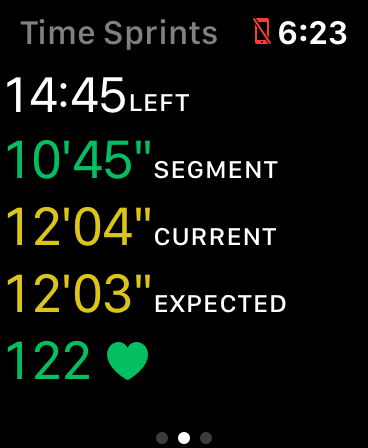
But, running with it today, I realized that it’s also now a game. Instead of showing this:

I show this:

The white dots are pace-setters, and so now it’s a game—a race. It’s a rudimentary one, but racing is fun, and I think this now is a fruitful direction for making it more and more like a race.

In a real race, one of the most fun parts (to me) is when you are close to another runner and have to compete. This is where I think I can add some functionality in the next version.

I could do even better if Apple Glasses are real.

Sprint-o-Mat 2021.1 is Available

i just released Sprint-o-Mat 2021.1 to the App Store.

Sprint-o-Mat is a watch-only app that lets you define, and then run, programmed running workouts. If you are using a training program for your running, you might be familiar with workouts like:

  1. Run 15 minutes to warm-up at a slow pace
  2. Then, Repeat 6 times
    1. Run 1/2 mile at your 5k pace
    2. Run 1/4 at a rest pace
  3. Cool down with a 10 minute run at a slow pace

Sprint-o-Mat comes with templates that you can use to define those runs. You can set individual paces and heart-rate zones for each leg.

Then, when you are running, you get a visual display of where you are in the workout and haptics and dings when it’s time to switch to the next segment.

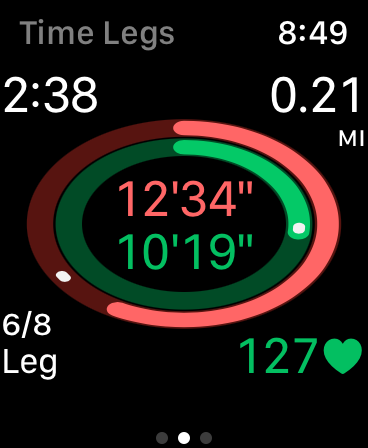
For example, yesterday I needed to run 8 miles at around 10:45 for a marathon training program I am doing. I broke it into a repeat of 8 1-mile runs. At mile 6, I took this screenshot

The outer ring is the entire 8-mile run, and the inner ring is the current mile. The white dots are pace runners. I can see at a glance that I am basically on pace.

The corners have more info. The top has total elapsed time and distance. The bottom has the segment name and my heart-rate.

Everything is green because I’m in the zones I set up.

At the end of the run, Sprint-o-Mat will save all the info to HealthKit so you can see it in Health or Activity on your phone. I recommend the RunGap app if you want to do more with the data (e.g. send it to Strava). I have worked with the developer to make sure Sprint-o-Mat saves the data in a format it can use.

In Icon-Last Development, I wrote about the evolution from the first version to this one and how it affected the icon. I have a few more articles coming later in January.

Sprint-o-Mat supports Apple Watch Series 3 to current, including all sizes from 38mm to 44mm, and it’s free. Take a look.

Use GitHub Profile Pages to Mirror Your Personal Site

In 2014, I wrote that a direct GitHub link to your profile was not good enough for a resume. At that time, the profile page was not customizable enough and was confusing for a recruiter or hiring manager to use to understand your portfolio.

My suggestion was to link to your-site.com/github instead (for example: loufranco.com/github). I recommended that you organize your open-source work more like a portfolio and highlight the most important work.

But, since 2014, GitHub has made updates to profile pages. Right now, I would say that they are finally good enough to use directly if you want. It’s just a README and you have total control of the text.

But, I decided to just mirror my personal page on it. The one big advantage of my personal page is that I have access to the analytics for it. I am not in the job market, but if I were, I could also put a contact form on it. My own page is also more customizable than a README.

GitHub profile pages will probably rank higher in search and are linked up directly in GitHub. So having something there is also important, which is why I mirrored my personal page.

My 2014 article had some advice on what should be on your profile page. I’ll be revisiting that soon.

Icon-Last Development

I am about to release an update to Sprint-o-Mat. I decided to change the text-based UI to something more visual.

The point of Sprint-o-Mat is to guide you during programmed workouts. In my training, I do workouts like this:

  1. Warm up for 15 minutes at a slow place
  2. Repeat 4 times
    1. Sprint 1/2 mile at my 5k pace
    2. Rest 1/2 mile at a slow pace
  3. Cool down for 10 minutes at a slow pace

Sprint-o-Mat lets you define these runs and then guides you during them with haptics and a read-out. The current version’s running UI looks like this:

I had a few problems with this. First, this is hard to read while running. Second, it doesn’t emphasize the most important information. Finally, there were actually two screens like this that you toggled between with a tap (the UI was not opinionated enough).

So, I changed it to this (just a single screen):

In this view, the outer oval tells you about your overall pace (the white dot is a pace setter) and the inner oval tells you about this particular segment. The center shows those two paces (overall and segment). If you want more info, the corners have details.

Based on this new UI, I changed my icon from:

To:

Once you use the app, this icon is a much better visual cue to it. It also evokes a track, which is a good symbol for sprinting. The original icon evoked sprinting more directly, but it has very little to do with the app otherwise.

This progression from app design back to icon is the opposite of how I did it for Fast-o-Mat.

Vague Tutorials Would Help with Coding Interviews

I think tutorials should be vaguer because “A [vague tutorial] would get the reader playing instead of reading and help them practice composing code instead of copying it.”

In a typical tutorial, all of the code is inline with the text, which tries to explain it line-by-line. In a vague tutorial, you’d get just enough information to write the code yourself. Some code would be given as a scaffold with blanks you fill in.

This is very much like how coding interviews work, so doing a series of vague tutorials would be good training for them.

This means that the sites that are doing training for coding interview (e.g. TopCoder and HackerRank) are to some extent vague tutorial writers. It’s interesting that they also gamify their sites (mostly via ranking), which gets at the theme of many of my posts, although I think gamification is not as good as playability.

In my last job hunt, I knew my target employers gave very hard data-structure/algorithmic style coding interviews, so I spent weeks on TopCoder (most failing) before I applied. The main things I got out of it was deciphering specifications under time pressure and iterative development. Both of these skills are invaluable when doing a coding interview, because unfortunately, tech job interviews are mostly auditions.