I use CityDesk to manage this site. One of the features is that each page can be tagged with keywords. The problem is, however, that the keywords are typed into a TextBox, not chosen from a List. I am having problems remembering all of the keywords I have decided to use, but I want to be consistent, because I plan on making pages for each keyword when I have enough blog entries (to help organize the archive page).
I wrote a small program to help me do this. If you have the same problem, check it out.
Here’s a screenshot
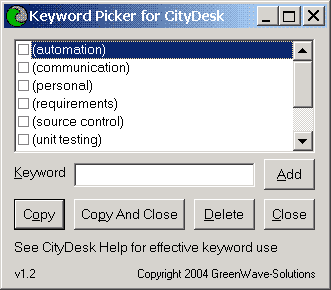
- Add keywords by typing then in, and then clicking the Add button.
- Put keywords into the clipboard by checking the ones you want and then clicking the Copy button. Then go to CityDesk and paste them into the keywords TextBox on the Properties tab of the article.
- Delete keywords by checking them and then clicking the Delete button.
- Keyword Picker is set to be always on top of other windows so you can overlay it on a full screen CityDesk while you work.
- Make sure to read the CityDesk help page titled Using Keywords Effectively.
To Install:
- Download KeywordPicker.zip (current version: 1.2)
- Extract KeywordPicker.exe to anywhere you want
- Run from anywhere, keywords are stored in the registry
Keyword Picker for CityDesk is provided as-is and with no support. E-mail questions, comments, requests via our contact page.
Update: Cool. Five minutes after posting this, it’s already in TK’s CityDesk Help Reference—which, by the way, has some good stuff for CityDesk users.